Lesson 2 of 14 · 30 min read
Context: a focused session and work carried across sessions
See what fills the context window and measure it with /context, choose between /compact and /clear, keep a session scoped to one service, and carry work into the next session with a handoff.
Code: shop-workspace and the four repositories its setup.sh clones, from the tag lesson-02-start to lesson-02-end. To get the demo, see lesson 1.
This chapter starts at the tag lesson-02-start and ends at lesson-02-end. From shop-workspace, the checkout script puts all five repositories (shop-workspace, contracts, orders-service, inventory-service, and payments-service) at the start state:
./checkout-lesson.sh 02To jump to the end state, add --end. It moves every repository to lesson-02-end:
./checkout-lesson.sh 02 --endYou need uv, Git, and a Claude account with Claude Code access. You do not need Docker or Kafka for these exercises, because the unit tests use a fake broker. Kafka matters only for the end-to-end flow.
This chapter was recorded on Claude Code 2.1.295 in October 2026. Documented defaults, limits, and labels are as of that month and may have changed since. The recorded session used Opus 5.5 (claude-opus-5-5).
Each claim about how Claude Code behaves says where it comes from: 'the documentation says' marks documented behavior, 'in the recorded run' marks what happened in the recording, and 'in my view' marks my own inference or recommendation. A recorded result describes one run, not output you are guaranteed to get.
Every token figure in this chapter is a recorded, single-run value. Your own figures will differ from them. The labs ask you to measure your own session first and to write the Claude Code version, the model, and the date beside each figure. Activity 1 takes the first measurement. Do it before you read the next section, so that your baseline does not depend on the recorded figures.
1. What fills the context window
In my view, think of the context as a budget that the session spends as it runs. The documentation says, in its best-practice guidance, that the context window fills fast and that performance degrades as it fills. That is the reason for the practices in this chapter: you measure what enters the context, and you decide what to carry into the next session.
The context is not empty at the first prompt. In the recorded run (Claude Code 2.1.295, Opus 5.5, single run), a session with no prompt typed already showed 28.9k tokens. I make no claim about what makes up that figure, so this chapter does not itemize it.
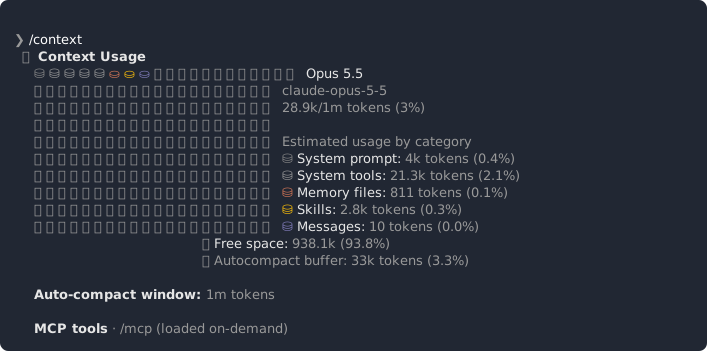
In my view, from the first prompt on, the session adds four kinds of content. They are your prompts, Claude's replies, the contents of files Claude reads, and the output of commands Claude runs. You can measure each kind. Activity 2 follows the total through a short task and asks you to tie each kind to a row of your own table. Activity 6 isolates one kind, the output of a test run.
The context-window page of the Claude Code documentation is an interactive simulation with illustrative numbers. None of its figures appear in this chapter. The only figures here are your own measurements and the recorded values.
The next section shows how to read the total with /context, and Activities 1, 2, and 6 take the measurements.
2. Inspecting the context with /context
/context shows what is in the context at that moment. Run it inside a session and read the token total on your own screen. The labs use only that number.
In my view, each report is printed into the session, so it can add to the total it measures. Take your own figure for that cost before you look at anyone else's. Activity 1 takes a baseline and a second report straight after it, and Activity 2 follows the total through a short task. Do Activities 1 and 2 before you read the next paragraph.
In the recorded run (Claude Code 2.1.295, Opus 5.5 (claude-opus-5-5), single run), each /context report added about 3.4k tokens. Set the change you wrote down in Activity 1 beside it. The two need not match, and neither is a size to rely on.
In my view, and based on that recorded value, take reports at the same points in a task instead of after every step. The difference between two reports includes the cost of the earlier report, so subtract your Activity 1 estimate to see what the task itself added.
3. Recorded figures, model aliases, and default effort
Every recorded figure in this chapter is collected here, with what it measured and the run it came from. All four come from one recording: Claude Code 2.1.295, Opus 5.5 (claude-opus-5-5), effort medium.
| Figure | What it measured | Claude Code | Model | Run |
|---|---|---|---|---|
| 28.9k tokens | Tokens in an empty session | 2.1.295 | Opus 5.5 (claude-opus-5-5) | Single run |
| About 3.4k tokens | Added to the context by each /context report | 2.1.295 | Opus 5.5 (claude-opus-5-5) | Single run |
| 1,066 tokens | Verbose pytest output (uv run pytest -v) | 2.1.295 | Opus 5.5 (claude-opus-5-5) | Single run |
| 144 tokens | Quiet pytest output (uv run pytest -q) | 2.1.295 | Opus 5.5 (claude-opus-5-5) | Single run |
The model and version are those of the recorded session. When you copy these figures into your own notes, write the model, version, and date that your own session reports.
In my view, a figure from one model, one version, and one date describes that run. Another model, version, or prompt can give different figures, so nothing in the table is a size to rely on.
Model facts
The table says which model the recorded session used. The facts below are separate: they describe aliases and defaults as the documentation gives them.
The documentation says the following:
- On the Anthropic API, the
opusalias resolves to Opus 5.5 (v2.1.280), thesonnetalias to Sonnet 5.5 (v2.1.284), and thehaikualias to Haiku 5.5 (v2.1.293). - Opus 5.5 is the default model on Pro, Max, Team, Enterprise, and the API.
- Opus 5.5, Sonnet 5.5, and Haiku 5.5 all default to medium effort.
Aliases and defaults change between releases, so check the current documentation before relying on these facts.
4. Choosing between /compact and /clear
Two commands change a long conversation, and they do different things.
The documentation says /compact takes instructions, so you can say what must survive. Write the instruction as a short statement of concrete things to keep. In the recorded run, the instruction was this one, which names two things:
/compact keep only the PaymentCaptured fields and the test commandsPaymentCaptured is an event whose schema lives in the contracts repository. The scoping section below names the file.
In my view, name the facts to keep. An instruction such as 'keep the important parts' names nothing, and Claude has to guess what you meant.
The documentation says /clear saves the earlier conversation for /resume. So /clear ends the live conversation without discarding the earlier one.
In my view, /compact leaves a condensed version of the conversation, shaped by your instruction, and /clear returns the live context to roughly its starting level. You check both in Activity 4. I make no claim about what /compact keeps. Judge it from your own totals before and after, and from a follow-up question that depends on what you asked to keep.
Two invented situations show the choice.
- You have spent a long session on how
orders-servicehandlesPaymentCaptured, with file reads and test output piled up, and you want to carry on with the same task. In my view,/compactwith an instruction that names what to keep fits. You accept that the rest is condensed, and a follow-up question tells you whether something you needed was lost. - You finish that task and want to start an unrelated one in the same service. Nothing in the old conversation is needed. In my view,
/clearfits, and the old conversation stays available through/resume.
5. Scoping a session to one service and giving Claude a schema file
The demo has five repositories, and orders-service is the unit of work in this chapter. The event schemas live in the contracts repository.
Scoping a session is an operational step: start Claude Code from the service's directory and keep your prompts inside that service. Open a terminal in the orders-service directory and run:
claudeThe documentation says the context window fills fast and that performance degrades as it fills. In my view, on that basis, keep the session to one service, so that Claude has less to read that the task does not need. You measure the effect on your own session with /context in Activity 5. For the first prompt, ask an orienting question about the service, as you did in your first session.
Sometimes a prompt needs the shape of data that is defined elsewhere. In the recorded run the question was which fields of the PaymentCaptured event orders would need to confirm an order, and that event is defined in contracts. Instead of making Claude read the code that implements the event, the recorded prompt names the schema file by its path:
Which fields of PaymentCaptured would orders need to confirm an order? @../contracts/src/shop_contracts/schemas/events/payment-captured.v1.schema.jsonType it as shown. In my view, the path is relative to orders-service, which is why the session starts in that directory. The schema file is the one deliberate step outside the service: you name it, and the rest of the prompt stays inside. Open the file and read its field names; that is all the exercise needs from it.
In my view, naming the file tells Claude where the answer is, so it has less to search. Activity 5 measures whether that holds in your runs.
In my view, a schema file gives shape, not behavior. It lists the fields of an event; it does not say what a service does when the event arrives. A question about behavior is not answered by the schema file, and Activity 5 asks you to notice such a case.
6. Keeping test output quiet
Command output is part of what enters the context, and you control how much. In the recorded run, the same tests were requested twice, first with verbose output and then with quiet output:
Run the tests with uv run pytest -v.Run them again with uv run pytest -q.In the recorded run (Claude Code 2.1.295, Opus 5.5 (claude-opus-5-5), single run), the verbose pytest output was 1,066 tokens and the quiet output was 144 tokens. These are two values from one run. They are not a general ratio and not a size to rely on.
In my view, test output enters the context when Claude runs the tests, as the output of any other command does. Activity 6 has you measure the pair yourself. Run the same tests in both modes, so that the difference you see comes from the output format and not from a different selection of tests.
In my view, quiet output trades detail for tokens. Before you rely on a quiet run, check that a failing test still shows its cause. The optional step in Activity 6 does that.
7. Writing a handoff document by prompt and starting a fresh session from it
A handoff document is content you choose, written by prompt, and carried into a fresh session. It has four parts: the state of the work, the decisions made, the next step, and links to files, commits, or commands instead of their content. In my view, a document that links stays small, and a reader can open the linked file when the detail matters.
In the recorded run, this was the prompt. It is self-contained, so you can reuse it unchanged:
Write a handoff for a fresh session: where we are, what we decided, the next step, and links to the files and commits instead of their content. Save it to the OS temp directory as handoff-orders.md and tell me the path.The four parts map onto the prompt in order: where we are, what we decided, the next step, and the links. In my view, the OS temp directory is outside the repositories, so the document is not committed.
Read the generated document the way you read a diff after your first change. Check each decision against what happened in the session, open each link, and have Claude correct what is wrong.
Then start a fresh session from the document. In the recorded run, after /clear, the prompt was:
Read <the path> and continue from it: what is the next step?<the path> stands for the path Claude printed in answer to the handoff prompt. Activity 7 uses a fuller request that asks for the state and the decisions as well as the next step, and has you compare the /context totals of the long and the fresh session as single-run values.
The handoff document differs from the two commands in the previous section. The documentation says /compact takes instructions, and in my view it condenses the same conversation. The documentation also says /clear saves the earlier conversation for /resume. In my view, a handoff document carries only the content you chose and checked.
In my view, the document is one run's output and can omit or misstate a decision. Review it before you rely on it.
8. Resuming and branching sessions
The documentation says /branch copies the transcript, switches you into the copy, and prints both session ids. In the recorded run, it did the same. The command-line equivalent is:
claude --continue --fork-sessionThe documentation says /clear saves the earlier conversation for /resume. That link is the only thing this chapter relies on about /resume. In the recorded run, /resume after /clear listed the session from before the /clear.
The documentation says that on v2.1.212 or later, /fork copies the conversation to a new background session. It is a different command from /branch, which switches you into the copy.
None of the documented statements above covers what happens to files on disk. In my view, both sessions work on the same checkout. That is why Activity 8 uses read-only prompts, so that you can see the difference between the two conversations without file edits blurring it.
In my view, use /branch when you want to try an alternative next step without losing the first line of work. A branch copies the whole conversation, whereas a handoff document carries only the content you chose.
9. Choosing the tool for a situation and ending at lesson-02-end
The table pairs five invented situations with a tool. The choices are in my view; the Label column marks which statements the documentation makes. Try Activity 9 first by covering the last three columns.
| Situation (invented) | Tool | What is kept | Label |
|---|---|---|---|
| A long session is still on the same task | /compact with an instruction | What your instruction names. For anything else, check your own session | In my view. The documentation says /compact takes instructions |
| An unrelated task starts in the same service | /clear | The earlier conversation is saved for /resume | The documentation says it is saved. In my view for the choice |
| Work continues tomorrow and decisions must survive | A handoff document, then a fresh session | Only the content you chose and checked, with links in place of content | In my view |
| You want to try an alternative without losing the current line of work | /branch | The transcript is copied and both session ids are printed | The documentation says so |
You want the earlier conversation back after /clear | /resume | The earlier conversation that /clear saved | The documentation says so |
When you have finished the activities you hold three things from orders-service: a measured, scoped working session, a handoff document written by prompt, and two saved sessions (the original and its branch). No repository should have an uncommitted change. Check with git status in each one.
To see what differs between the two tags, run git diff lesson-02-start lesson-02-end in each repository.
To jump to the end state, run this from shop-workspace. It moves every repository to lesson-02-end:
./checkout-lesson.sh 02 --endActivity 1: Take a baseline /context report at lesson-02-start
You take your own baseline before you compare it with any recorded figure, so that the recorded values read as one run among others. This activity puts all five repositories at lesson-02-start and gives the later activities a measured baseline in your own checkout. No application code changes.
Steps:
- From
shop-workspace, run./checkout-lesson.sh 02so that all five repositories are atlesson-02-start. - Open a new Claude Code session from the
orders-servicedirectory and type no prompt. The recorded prompts later in the chapter use a relative path tocontracts, which resolves from that directory. - Run
/contextand write down the token total. - Write down the Claude Code version your installation reports, the model your session reports, and today's date.
- Run
/contexta second time and write down how much the total changed. - Only now compare your figures with the recorded values: 28.9k tokens in an empty session, and about 3.4k added per report (the recorded run, a single run on Claude Code 2.1.295 with Opus 5.5,
claude-opus-5-5).
You should end with:
- a note holding the baseline total, the change after the second report, the Claude Code version, the model, and the date
- one sentence saying how your figures compare with the recorded ones, and why they need not match
Hints:
- If your total is far from 28.9k, do not try to reproduce it. A different total is no fault.
- Start from the same directory each time you take a baseline, so that later figures compare.
Check yourself:
- The note has two numbers and three labels (version, model, date), written before you quoted any recorded value.
- Your comparison sentence calls no recorded value typical, expected, or a documented size. It treats the recorded values as one run on another setup.
Activity 2: Watch the context grow during a task
You follow the context total through a short task and tie what filled it to rows of your own table. The subject of your questions is orders-service. No file changes.
Steps:
- In the session from Activity 1, ask one orienting question about
orders-servicethat makes Claude read at least two files. An example that is not from the recording:What does orders-service do, and which files hold its main logic?Then run/context. - Ask a second question whose answer needs a long reply. An example that is not from the recording:
Explain in detail how orders-service is organized, with one short paragraph for each file you have read.Then run/context. - Ask Claude to run one command in the service and show its output. An example that is not from the recording:
Run git log --oneline -5 and show me the output.Then run/context. - Fill a table with the columns action, total before, total after, and difference. For the first action, use the last report from Activity 1 as the total before. Note your Activity 1 change between two reports as the estimate of each report's own cost.
- Write which action added the most. Name the kinds of content the session added (your prompt, Claude's reply, file contents, command output) and point at the row of your table that shows each.
You should end with:
- a growth table with at least three actions and your own figures
- a one-sentence ranking of what added the most
Hints:
- Keep your prompts short, so that the added tokens come mostly from what Claude read and wrote.
- Repeat one action if two rows look the same. Single runs vary.
Check yourself:
- The table has before, after, and difference for at least three actions, and it states how each report's own cost was handled.
- Every kind of content named in your ranking sentence cites a row.
Activity 3: Rewrite four claims as dated recorded values
You practice stating a recorded figure with its model and version, stating a current-state fact with the date on which you checked it, and rejecting a figure presented as a documented size. No repository changes.
Steps:
- Take the four draft sentences below. They were written for this exercise. They are invented, and each has a fault.
- Draft 1: An empty Claude Code session uses 28.9k tokens.
- Draft 2: Each /context report costs 3.4k tokens.
- Draft 3: Quiet test output cuts a test run from 1,066 to 144 tokens.
- Draft 4: Sonnet is the default model.
- Rewrite each of the first three drafts as a recorded value. State the figure, what it measured, 'in the recorded run', that it was a single run, Claude Code 2.1.295, and the model from the reference table in this chapter (Opus 5.5).
- Rewrite draft 4 from the model facts block, then add a separate note of the date on which you checked that fact.
- Mark each rewritten sentence with the label that applies: recorded-run behavior or documented behavior.
You should end with:
Four rewritten sentences, each with its label.
Hints:
- A figure sentence has five parts: the figure, what was measured, single run, version, and model.
- Draft 3 claims a saving. A recorded sentence reports the two values from one run and claims no more.
- Draft 4 names a model that the model facts block does not give as the default, and it comes with no note of the date on which it was checked.
Check yourself:
- Each of the three figure sentences names the figure, the measurement, 'in the recorded run', the single run, version 2.1.295, and Opus 5.5.
- The fourth sentence matches the model facts block. It names Opus 5.5 as the default, comes with a note of the date on which you checked it, and adds no comparison.
This exercise fixes the convention you apply whenever a recorded value appears.
Activity 4: Compact with instructions, then clear and resume
You observe what /compact and /clear each leave in the session, and confirm that /clear does not lose the earlier conversation. This works inside the orders-service session from the earlier activities. No file changes.
Steps:
- In the session from Activity 2, run
/contextand note the total (total A). - Write an instruction that names what must survive: the service you were examining and the answer to your first question. Run
/compactfollowed by your instruction. For the shape, in the recorded run the command was/compact keep only the PaymentCaptured fields and the test commands. - Run
/contextand note the total (total B) and the change from total A. - Ask a follow-up that depends on what you asked to keep. Judge whether the answer used it.
- Run
/clear, then/context, and note the total (total C). - Run
/resumeand return to the conversation from before/clear. Check whether its earlier turns are present, and note any difference. - Write two sentences, one on what
/compactkept and one on what/clearkept, using only what you saw.
You should end with:
- totals A, B, and C
- your
/compactinstruction - the two sentences, labeled as observations from your session
Hints:
- In my view, name the facts to keep instead of asking for 'the important parts'.
- If the follow-up answer lost something you needed, change the instruction and try again.
Check yourself:
- Your
/compactinstruction names at least two concrete things to keep. - The note holds three totals and a statement on whether the earlier turns were present after
/resume, or what differed. - Only the two statements the documentation makes, that
/compacttakes instructions and that/clearsaves the earlier conversation for/resume, appear without an observation label. Everything else is marked as something you saw.
Activity 5: Scope the session to orders-service and compare with and without a schema file
You see a scoped session answer a question that depends on a data shape defined outside the service, once without and once with the schema file named in the prompt. The scoped session is orders-service, and the input is the PaymentCaptured schema file in contracts. No repository changes.
Steps:
- Start a new session from the
orders-servicedirectory and run/contextfor a baseline. - Route A, without the schema file. Ask the recorded question without its path (a variation on the recorded prompt, not from the recording itself):
Which fields of PaymentCaptured would orders need to confirm an order?Write down where Claude looked. Then run/context. - Run
/clear, then/contextfor a new baseline. - Route B, with the schema file. Ask the recorded prompt in full, path included:
Which fields of PaymentCaptured would orders need to confirm an order? @../contracts/src/shop_contracts/schemas/events/payment-captured.v1.schema.json. Then run/context. - Compare the two routes: the change in total, whether the answer matches the schema file (open the file and check it yourself), and anything the answer needed that the schema file does not hold.
- Write two sentences on when you would give the schema file and when you would let Claude read the code. Begin each sentence with 'in my view'.
You should end with:
- a two-route table of your own figures, with a baseline and a report for each route
- a note on what the schema file did not tell Claude
- the two sentences, each beginning with 'in my view' and limited to what your single runs showed
Hints:
- Check the answer against the schema file yourself. Do not rely on Claude's statement that it matches.
- If the two totals are close, run each route once more before you conclude anything.
Check yourself:
- Both routes were measured from a baseline with the same method.
- Both sentences begin with 'in my view'.
- Your conclusion is limited to your runs and names one thing the schema file does not hold. No sentence says a schema file is always cheaper or better.
Activity 6: Compare verbose and quiet test output
You measure what test output adds to the context, and set your pair of figures beside the recorded pair. This activity runs the existing unit tests of orders-service. The only possible repository change is the optional scratch failure, which you revert with Git.
Steps:
- Start from a baseline in
orders-service, in a new session or after/clear. Run/contextand note the total. - Ask Claude to run the service's unit tests with verbose output, using the recorded prompt:
Run the tests with uv run pytest -v.Then run/context. - Run
/clear, then/contextfor a new baseline. Ask for the quiet run:Run the tests with uv run pytest -q.In the recorded run the prompt was 'Run them again' in the same session. After/clearthere is nothing for 'them' to refer to, so name the tests as shown. Then run/context. - Fill a table with the columns invocation, tests run, total before, total after, and difference.
- Set the recorded pair beside yours: 1,066 tokens verbose and 144 tokens quiet, a single run on Claude Code 2.1.295 with Opus 5.5 (
claude-opus-5-5). Label it 'in the recorded run'. - Optional: make one test fail with a scratch change, run the quiet invocation, and check that the failing test and its cause are still shown. Then revert the change with Git.
You should end with:
- a two-row table of your figures, with the recorded pair beside it
- for the optional step, a note on whether the failure stayed visible, and a clean
git status
Hints:
- Run the same tests both times, so that the difference comes from the output format.
- If the quiet run is not smaller, check that you asked for the same tests.
Check yourself:
- The table lists the same test selection twice, with two differences.
- The recorded pair carries its version, model, and single-run label, and your text calls it neither typical nor a documented size.
- If you did the optional step,
git statusin the service shows no leftover change.
Activity 7: Write a handoff document by prompt and start a fresh session from it
You produce a checked handoff document for the work so far and show a fresh session continuing from it. This activity produces the reusable session artifacts for orders-service: a reviewed handoff document kept outside tracked source, and the handoff prompt as a single block.
Activities 4 to 6 cleared or replaced your session, so the session you have open now holds little more than the last quiet test run and has no decisions to hand off. Build a long session first, then run the rest of this activity in that session.
Steps:
-
Build the long session. Use the session that is open from Activity 6, or start a new one from the
orders-servicedirectory withclaude. Ask three or four orienting questions aboutorders-service, one at a time, that make Claude read files. Examples that are not from the recording:What does orders-service do, and which files hold its main logic?andWhere in orders-service is an order created, and what state does it start in?Do not run/clearor/compactuntil you start the fresh session in step 7. After each answer, note what you conclude from it. Those conclusions are the decisions the handoff document records. -
Choose a concrete next step for the work in this session, such as a question to answer or a check to run. Do not carry it out. Tell Claude in one sentence what it is, so that the document records your choice.
-
Send the handoff prompt. This is the prompt from the recorded run. Keep it as one block:
Write a handoff for a fresh session: where we are, what we decided, the next step, and links to the files and commits instead of their content. Save it to the OS temp directory as handoff-orders.md and tell me the path. -
Note the path Claude gives you. The file sits outside the service's tracked source, so it is not committed.
-
Read the document the way you read a diff. Check each decision against what happened in the session and open each link. Ask Claude to correct anything wrong.
-
Run
/contextin this long session and note the total. -
Start a fresh session from the
orders-servicedirectory, either by leaving the session and runningclaudeagain or with/clear(the recorded run used/clear). Make the first prompt name the document and ask for a restatement. In the recorded run the prompt wasRead <the path> and continue from it: what is the next step?. This variant, which is not from the recording, asks for more:Read <the path> and, before doing anything else, tell me in your own words the current state, the decisions made and the next step. -
Run
/contextin the new session. Compare the total with the long session and with your baseline from Activity 1. -
Check the new session's restatement against the document and list anything lost or wrong.
You should end with:
- the handoff prompt as a single block
- the handoff document
- two
/contexttotals, for the long session and the fresh session - a short list of what the fresh session got right, lost, or got wrong
Hints:
- Ask questions whose answers you can check in the code, so that the decisions in the handoff rest on something you saw.
- Ask for file paths and test commands as links rather than pasted code or output.
- Write each decision on one line with its reason.
- The document is one run's output. A second run of the same prompt can differ.
Check yourself:
- The handoff prompt was sent in a session that holds your three or four orienting questions and their answers, with no
/clearor/compactbetween the first question and the handoff prompt. - The document has the four parts, and every link points at something that exists.
- The first prompt of the new session holds only the document's name and the restatement request. No old conversation is pasted in.
- Both totals are reported as single-run values with version, model, and date, and your list of losses is present even when it is empty.
git statusinorders-serviceshows no new file from this activity.
Activity 8: Branch a session and resume both conversations
You see what /branch copies and how /resume returns to a saved conversation, using read-only prompts. Every repository stays unchanged. You finish with two saved sessions for orders-service.
Steps:
- In the fresh session from Activity 7, or in any session with a few turns, run
/branchand write down the two session ids it prints. - In the branch, ask a read-only question that tries an alternative next step, and put a distinctive word in it. An example that is not from the recording:
Describe an alternative next step in two sentences and call it the tangerine option.Do not edit files in this activity. - Return to the original conversation with
/resumeand check whether your question appears in it. - Return to the branch with
/resumeand check that the question is there. - Write one sentence saying what
/branchcopied, and name the command-line equivalent. - Optional: leave the session with
/exit, runclaude --continue --fork-session, and compare the ids with the ones you wrote down.
You should end with:
- the two session ids
- a short table of which question appears in which conversation
- one sentence on what
/branchcopied, with the command-line equivalent
Hints:
- Use a distinctive word in the branch question, so that it is easy to find.
- Keep both sessions read-only, so that a file edit does not blur what was copied.
Check yourself:
- Both ids are recorded, and your sentence says
/branchcopies the transcript. It presents no claim about files on disk as something the documentation says. - The table reports what you saw. Any result that differs from what you expected is written as a run observation, not corrected silently.
Activity 9: Match five invented situations to the right tool
You apply every tool in the chapter to situations and state, for each, what is kept and what the statement rests on. This activity closes the chapter with no repository change, and you confirm the end state against lesson-02-end in the last step.
The five situations below are invented for this exercise.
- Situation 1: A long session is still on the same task.
- Situation 2: An unrelated task starts in the same service.
- Situation 3: Work continues tomorrow, and decisions must survive.
- Situation 4: You want to try an alternative without losing the current line of work.
- Situation 5: You want the earlier conversation back after
/clear.
Steps:
- For each situation, choose
/compact,/clear, a handoff document with a fresh session,/branch, or/resume, and write one sentence of reasons. - For each choice, write what is kept and what is not, and label the statement documented behavior, recorded-run behavior, or in my view.
- Compare your choices with the decision table at the end of the chapter and note any difference you would argue for.
- Confirm the end state against
lesson-02-end: fromshop-workspace, run./checkout-lesson.sh 02 --end.
You should end with:
Five choices, each with its reasons and a labeled statement of what it keeps.
Hints:
- Several tools can fit. Say which cost you accept: a smaller context, or content you must check yourself.
- Check your
/branchand/clearstatements against the documented behavior before you label them.
Check yourself:
- You have five rows, each with a kept and not-kept statement and one of the three labels.
- Your
/clearand/branchstatements match the documentation:/clearsaves the earlier conversation for/resume, and/branchcopies the transcript. Nothing you wrote contradicts either.
This chapter adds working practice to the shop, not application features. You work in orders-service at the lesson-02-start state and produce session artifacts instead of code.
Starting state: after ./checkout-lesson.sh 02 from shop-workspace, all five repositories (shop-workspace, contracts, orders-service, inventory-service, and payments-service) are at lesson-02-start. You have Claude Code access, uv, and Git. Kafka and Docker are not running and are not needed, because the unit tests use a fake broker.
What you do in orders-service:
- Take a baseline and growth figures with
/context, each with the Claude Code version, model, and date (Activities 1 and 2). - Rewrite four claims as recorded values, using Claude Code 2.1.295 and Opus 5.5 for the recorded figures, or as a current-state fact with a note of the date on which you checked it (Activity 3).
- Compare totals before and after
/compactand/clear, and return to the earlier conversation with/resume(Activity 4). - Ask the
PaymentCapturedquestion from theorders-servicedirectory without and with the schema file fromcontractsnamed in the prompt (Activity 5). - Run the existing unit tests with verbose and quiet output and set your pair beside the recorded pair (Activity 6). The only possible repository change is an optional scratch test failure, which you revert with Git.
- Build a long session with orienting questions about
orders-service, write a handoff document by prompt in that session, keep the prompt as one block, review the document, and start a fresh session from it (Activity 7). The document is saved to the OS temp directory, outside tracked source. - Branch a session with read-only prompts and note which question appears in which conversation (Activity 8).
- Match five invented situations to the right tool (Activity 9).
Ending state: your checkout can be moved to lesson-02-end by running ./checkout-lesson.sh 02 --end from shop-workspace. You hold your own figures with version, model, and date, a handoff document outside tracked source, the handoff prompt as a single block, and two saved sessions (the original and its branch). No uncommitted change is left in any repository. Run git diff lesson-02-start lesson-02-end in each repository to compare the two tags.