Lesson 7 of 14 · 32 min read
Subagents: delegating focused work
Delegate read-only work to the built-in Explore and Plan subagents, write a custom reviewer agent, and run work in a worktree that a hook creates next to the service.
Code: shop-workspace and the four repositories its setup.sh clones, from the tag lesson-07-start to lesson-07-end. To get the demo, see lesson 1.
This chapter starts at the tag lesson-07-start. Put all five repositories there with:
./checkout-lesson.sh 07To jump to the finished state, for example when a live demo goes wrong, use:
./checkout-lesson.sh 07 --endYou need Claude Code access, Git and uv. Start each session in orders-service, not in the workspace root, as you did when scoping a session to one service. The recorded lesson 07 run starts no Kafka, no Docker container and no running shop, and nothing in this chapter needs them.
This chapter was recorded on Claude Code 2.1.295 in October 2026. Documented defaults, limits and labels are as of that month and may have changed since. The recorded run used Opus 5.5 (claude-opus-5-5) at medium effort in auto permission mode.
Each claim says where it comes from: 'the documentation says' marks documented behavior, which I paraphrase; 'in the recorded run' marks what happened in the lesson 07 recording; and 'in my view' marks my own inference or recommendation. A recorded result describes one run, not output you are guaranteed to get.
At the end you have a custom reviewer agent at .claude/agents/reviewer.md, a WorktreeCreate hook script at .claude/hooks/worktree-create.sh with its settings entry, and a .claude/worktrees/ line in .gitignore. With the hook in place, Claude Code creates worktrees beside orders-service, and ../contracts resolves from inside them. In the recorded run, the session ran in orders-service, so the files live in that repository.
1. Explore and Plan, the built-in read-only subagents
A subagent is a separate agent that the main conversation hands a focused task to. Claude Code includes two built-in ones, Explore and Plan.
The documentation says, on its sub-agents page, that Explore and Plan are built-in subagents and that both are read-only. In my view, because neither can edit, a delegation to either should leave your working tree as it was. Activity 1 checks that with git status.
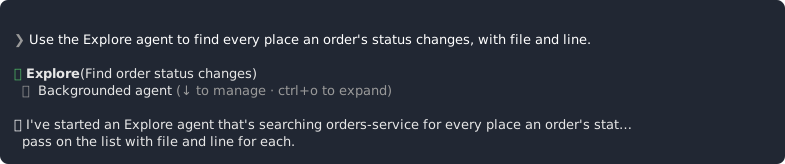
In the recorded run, the session started with claude in orders-service, and these two prompts were typed as written.
Use the Explore agent to find every place an order's status changes, with file and line.Use the Plan agent to plan how GET /orders/{id} could also return confirmed_at. Don't change anything.In the recorded run, both subagents were read-only, which agrees with the documentation. The replies are what one run produced. Model output varies between runs, so expect yours to differ in wording and detail.
The Plan subagent is a different thing from the plan mode taught in chapter 3.
When is a subagent the right tool? In my view, and based only on what the documentation says about the built-ins:
- Use Explore for a read-only question that needs several files read, like the first prompt above.
- Use Plan when you want a plan and no change, like the second prompt.
- If the task needs edits, a built-in is the wrong tool, because both are read-only.
- A focused review is a job for a custom agent, which the next section builds.
- Delegated work can run in the background, which a later section covers.
2. Writing a reviewer agent
In the recorded run, the reviewer was created by asking Claude Code to write it:
Create a reviewer subagent in .claude/agents/reviewer.md that checks code for concurrency issues, error handling and N+1 queries.In the recorded run, the agent lives at .claude/agents/reviewer.md in orders-service and checks code for concurrency issues, error handling and N+1 queries. Claude Code wrote the file's text from that prompt, so your copy will be worded differently. The version at lesson-07-end is the recorded one. The course makes no claim about the agent file format, so the file is shown only as the recorded demo configuration, without a field list. Check the current sub-agents page before relying on any field.
The documentation says, on its sub-agents page, that agent files are watched, but that the first agent file in a new agents directory needs a restart, and that claude -c keeps the conversation. In the recorded run, after the file was created, /exit and then claude -c were typed, and the first agent in the new .claude/agents/ directory loaded after that restart. The rule is stated here for the first agent file in a new agents directory only.
In the recorded run, after the restart the reviewer was used:
Use the reviewer on src/orders/handlers.py.Treat the reviewer's answer as one model run's reading of that file. It is something to weigh, not a verdict, a guarantee or a security control.
The documentation says (sub-agents page) that /agents prints a reminder to ask Claude or to edit the agent directories, and that an agents wizard existed through v2.1.197. In my view, because the recorded 2.1.295 is later than v2.1.197, the reminder is the behavior to expect there. Activity 3 has you compare your own output.
If the file Claude writes for you names a model alias, this is what the alias resolves to. The documentation says (model configuration documentation) that on the Anthropic API the aliases opus, sonnet and haiku resolve to Opus 5.5 v2.1.280, Sonnet 5.5 v2.1.284 and Haiku 5.5 v2.1.293, and that all three default to medium effort.
Skills have their own refresh route, covered in chapter 6.
3. Running subagents in the background
The documentation says (sub-agents page) that fork mode is the default in interactive sessions and that, with fork mode on, subagents run in the background. In the recorded run, lesson 07 saw the same.
In the recorded run, the parallel prompt asked for two delegations at once:
Run the reviewer on src/orders/worker.py and, in parallel, the Explore agent on how events are published.That is one prompt and two delegations: a reviewer pass and an Explore question. Both read code, and neither was asked to change it. What your main session does while they run, and in what order they finish, is for you to record. Activity 4 has you do that. One run does not make a pattern.
The documentation says (checkpointing documentation) that checkpoints usually do not restore subagent edits, and that checkpoints are not a replacement for version control. In my view, start any delegation that edits files from a committed state.
There are two kinds of parallel work. Several subagents in one session share one working tree. Several sessions in separate worktrees each get their own working directory, which the next sections cover. In my view, two writers in one working tree is a risk, because a working tree is shared and both change the same files.
4. How deep subagents can nest
The documentation says (sub-agents page) that a subagent can spawn subagents up to three layers below the main conversation. The figure can change because earlier defaults differed. Superseded: five layers in v2.1.172-2.1.216 and one layer in v2.1.217-2.1.218.
Nesting was not reproduced in any recorded run. This is documented behavior only, and you are not asked to reproduce it.
5. Subagents under the session's permission mode
A session runs under one permission mode, and the permissions material earlier in the course names auto, bypassPermissions and acceptEdits among them. In auto mode a classifier checks actions. In the recorded run, the session ran under auto mode, so everything recorded in this chapter happened under auto mode.
The documentation says (permission-modes page and sub-agents page, paraphrased; the two pages agree) that under auto, bypassPermissions or acceptEdits, a subagent's own permissionMode is ignored. In my view, a subagent's own permissionMode is a permission mode set for that subagent itself, separate from the mode of the session. This chapter does not show where that setting is written, because it makes no claim about the agent file format. The sub-agents page is the place to check.
The documentation says (permission-modes page, paraphrased) that in auto mode the classifier checks subagents at spawn, per action and at completion. That describes where the checks happen. It is not a promise about what they catch.
This chapter makes no claim about what a subagent's permissionMode does when it is honored, or about how session modes other than these three treat subagents. Check the current sub-agents and permission-modes pages before relying on either, and do not fill either gap from memory or from other projects.
The documentation says (permission-modes page) that the classifier runs on Sonnet 5 by default. That is a separate fact from the model aliases. The documentation says the sonnet alias resolves to Sonnet 5.5 (model configuration documentation), so keep the two apart.
This chapter reports no classifier decision about a subagent from the recorded run.
6. Worktrees from claude --worktree
A worktree is a separate working directory for a parallel session. Claude Code can create one for you, and by default it uses git to do it.
The documentation says (worktrees page) that claude --worktree <name> creates .claude/worktrees/<name> on a branch named worktree-<name>. The branch is based by default on the remote default branch (the worktree.baseRef setting, value fresh). That default changed in May 2026.
In my view, as a consequence of the documented default, work that exists only in your local clone, such as unpushed commits, is not what the new branch starts from.
In the recorded run, the first worktree session was started with this command:
claude -w try-defaultIn my view, -w is the short form of --worktree, since the recorded run used it to start a worktree session. The prompt that followed was:
Run the tests and tell me what fails. Don't fix anything.In the recorded run, the default location broke the ../contracts path dependency of orders-service. Activity 6 repeats the step so that you capture the error text from your own run.
In my view, going by the documented location and the recorded failure, the session starts in orders-service, so the default worktree sits under orders-service/.claude/worktrees/. Inside that worktree a relative ../contracts names a folder inside .claude/worktrees/, not the contracts repository that sits next to orders-service.
The documentation says (worktrees page, Exit section), and this is a point to hold for later, that on exit a clean unnamed session worktree and its branch are removed, and that new commits count as work that prompts. The rule's scope is a clean unnamed session worktree. The worktree in this section has a name, so the rule is not stated for it.
7. A WorktreeCreate hook for worktrees next to the service
The documentation says (hooks page, WorktreeCreate section, paraphrased) that a WorktreeCreate hook replaces default git worktree creation. A command hook prints the path of the new worktree as the last line of its stdout. If the hook fails or prints no path, worktree creation fails. .worktreeinclude is not processed for hook-created worktrees.
In my view, once the hook replaces creation, the hook decides where the directory goes and what branch it gets. This chapter makes no claim about which defaults of the git route carry over to a hook-created worktree, so do not assume any; check the current hooks page.
In the recorded run, the hook came from one prompt.
Add a WorktreeCreate hook so worktrees are created next to the service as ../orders-service-<name> with git worktree add, and print the path. Put the script in .claude/hooks/worktree-create.sh. Also add .claude/worktrees/ to .gitignore.That prompt defines the recorded configuration: a script at .claude/hooks/worktree-create.sh that runs git worktree add to create ../orders-service-<name> and prints the path, a settings entry for the hook, and the .claude/worktrees/ line in .gitignore (that folder is where the git route puts worktrees by default). Claude Code wrote the script and the settings entry. Their text as recorded is in the lesson-07-end tag, and yours will be worded differently. Activity 7 compares the two.
In the recorded run, after /exit, claude -w try-hook was typed, and then Run the tests. The worktree sat next to the service, so ../contracts resolved. With the name try-hook, the prompt's pattern gives ../orders-service-try-hook. In my view, that path is a sibling of orders-service, so from inside it ../contracts is the contracts repository next to the service.
8. What happens to a hook-created worktree on exit
In the recorded run (Claude Code 2.1.295), after Run the tests., /exit was typed. Claude Code removed the clean hook-created worktree directory without asking, and the branch was kept. That is what happened in one run.
In my view, if a hook-created worktree holds work you want to keep, commit or push it before /exit, and run git worktree list afterward to see what is left.
The one exception is Activity 8, which observes the exit itself. For that test, leave the worktree clean (no changed files, no untracked files and no new commits) and keep any real work elsewhere. This chapter makes no claim about what exit does with changed or untracked files in a hook-created worktree, and it does not test it.
The documentation says (hooks page, WorktreeRemove section, paraphrased) that WorktreeRemove runs when Claude Code cleans up a hook-created worktree, and that an unnamed clean worktree is removed without a prompt. The page's text lists changed or untracked files and does not list commits.
The documentation says (worktrees page, Exit section, paraphrased) that for a worktree Claude Code creates with git, a clean unnamed session worktree and its branch are removed, and new commits count as work that prompts. So git-created and hook-created worktrees follow different exit rules.
In my view, the recorded removal of a clean worktree without a prompt is consistent with the hook-route text above. That text describes an unnamed worktree, and the recorded worktree had a name, try-hook, so the run is an observation of that case and not a documented rule for named worktrees. It is not established whether a WorktreeRemove hook was configured in the recorded run.
The documentation does not say what happens on exit when no WorktreeRemove hook is configured. The recorded removal stays an observation from one run on 2.1.295. Do not generalize it to a setup without a WorktreeRemove hook, or to any other hook-created worktree.
In my view, as a point about git and not about Claude Code, commits made on a worktree's branch stay on that branch when only the worktree directory is removed.
9. Ending at lesson-07-end
At lesson-07-end, orders-service holds the reviewer agent at .claude/agents/reviewer.md, the WorktreeCreate hook script at .claude/hooks/worktree-create.sh with its settings entry, and the .claude/worktrees/ line in .gitignore. The recorded run finished by committing them, and Activity 8 ends with the same commit.
To compare your state with the tag, run this in orders-service:
git diff lesson-07-endClaude Code wrote the agent file, the script and the settings entry from the recorded prompts, so differences in wording are expected. List them and explain them. A difference is a finding, not an error. git diff ignores untracked files, so if a new file is missing from the output, git add -N <path> makes it visible.
To jump to the recorded end state instead, run ./checkout-lesson.sh 07 --end.
The facts in this chapter that can change, with their label and the version or date the fact already carries. Where a row has none, the recording note at the start of the chapter gives the time frame:
| Fact | Label | Date or version |
|---|---|---|
| Fork mode is the default in interactive sessions, and with it on, subagents run in the background | The documentation says; the recorded run agreed | Recording note at the start of the chapter |
| A subagent can spawn subagents up to three layers below the main conversation | The documentation says | Earlier defaults were five layers in v2.1.172-2.1.216 and one layer in v2.1.217-2.1.218 |
claude --worktree bases the new branch on the remote default branch (worktree.baseRef value fresh) | The documentation says | The default changed in May 2026 |
/agents prints a reminder to ask Claude or to edit the agent directories; an agents wizard existed through v2.1.197 | The documentation says | Wizard through v2.1.197 |
| Under auto, bypassPermissions or acceptEdits a subagent's own permissionMode is ignored; in auto mode the classifier checks subagents at spawn, per action and at completion | The documentation says | Recording note at the start of the chapter |
| The classifier runs on Sonnet 5 by default | The documentation says | Recording note at the start of the chapter |
| The aliases opus, sonnet and haiku resolve to Opus 5.5 v2.1.280, Sonnet 5.5 v2.1.284 and Haiku 5.5 v2.1.293 on the Anthropic API; all three default to medium effort | The documentation says | Recording note at the start of the chapter |
| Checkpoints usually do not restore subagent edits and are not a replacement for version control | The documentation says | Recording note at the start of the chapter |
What this chapter did not establish:
- Nesting was not reproduced in any recorded run.
- No recorded classifier decision about a subagent is reported.
- The course makes no claim about the agent file format, which is shown only as recorded. Check the current sub-agents page for it.
- The documentation does not state what happens on exit from a hook-created worktree when no WorktreeRemove hook is configured, and it is not established whether the recorded run had one, so the recorded removal is an observation from one run.
Activity 1: Ask Explore and Plan read-only questions in orders-service
Practice the two built-in subagents and confirm that they leave the working tree unchanged. This activity adds no files. It confirms a clean orders-service at lesson-07-start before the reviewer agent and the hook are added.
Steps:
-
Run
./checkout-lesson.sh 07. Inorders-service, rungit statusandgit describe --tagsand save both outputs as your before state. If the tree is not clean at the start, note that first so the comparison stays honest. -
Start a session in
orders-service, not the workspace root, withclaude. -
Send the Explore prompt exactly as the recorded run typed it. It asks a question about
orders-servicethat needs several files to be read:Use the Explore agent to find every place an order's status changes, with file and line. -
Send the Plan prompt exactly as recorded. It asks for a plan, not for a change:
Use the Plan agent to plan how GET /orders/{id} could also return confirmed_at. Don't change anything. -
Run
git statusinorders-serviceagain and compare it with the before state. -
Write a short note for each prompt: what you asked, how your session showed that a subagent handled it (if it did), and one sentence on what came back. Head the note 'my run' and add your Claude Code version.
You should end with:
- the before and after
git statusoutput - a two-entry run note labeled with your version
Hints:
- Use the recorded prompts word for word and expect your replies to differ from the recorded ones.
- If the session answers without delegating, record that as your result and then ask for the subagent explicitly.
- If the tag leaves the tree unclean at the start, record that first.
Check yourself:
- The working tree is unchanged by both delegations:
git statusinorders-serviceafter the two prompts matches the before state. - The note keeps documented and recorded claims apart: the statement that Explore and Plan are read-only is attributed to the documentation, and the replies are labeled as one run with a version number.
Activity 2: Decide what to delegate
Apply the decision rule from the earlier sections to six short tasks. This activity adds no files. It prepares the choices you make in the reviewer, background and worktree activities.
Steps:
- Take the six tasks below. They are invented for this exercise and are not taken from the recorded run.
- (a) list every place
orders-servicepublishes an event - (b) outline the steps for adding a field to the order schema
- (c) review the diff of a finished change
- (d) rename a function across the package when you may want to undo it
- (e) answer two unrelated read-only questions at the same time
- (f) edit two files in the same working tree from two sessions at once
- (a) list every place
- For each task choose one: main session, Explore, Plan, the custom reviewer, a background subagent, or a separate worktree session.
- Write a one-line reason per task and label it 'the documentation says', 'in the recorded run' or 'in my view'.
- For task (d), say what you would do before delegating, given the checkpoint limit for subagent edits.
- Write the result as a six-row table with the columns task, choice, reason and label.
You should end with:
- a six-row table of task, choice, reason and label
Hints:
- The facts you may cite: Explore and Plan are read-only (the documentation says); with fork mode on, subagents run in the background (the documentation says); subagent edits are usually not restored by checkpoints (the documentation says); a worktree is a separate working directory (the documentation says, for the git route).
- Do not argue from speed, token use or quality. This chapter makes no claim about any of them.
- More than one choice can be defensible. The label on the reason is what the exercise checks.
Check yourself:
- Every reason cites a supported fact or is labeled 'in my view': each row carries one of the three labels, and no row claims a speed, token or quality gain.
- Task (d) leads back to version control: the row names committing or branching first and does not rely on checkpoints to undo the subagent's edits.
Activity 3: Add the reviewer agent and restart
Create the custom reviewer agent, meet the restart rule for the first agent file in a new agents directory, and compare /agents with the documented wording. This activity adds the reviewer agent definition that stays in the demo at lesson-07-end.
Steps:
-
In a session in
orders-service, send the recorded prompt:Create a reviewer subagent in .claude/agents/reviewer.md that checks code for concurrency issues, error handling and N+1 queries. -
In the same, still-running session, try to invoke the reviewer with the prompt the recorded run used after its restart, and note what happens before any restart:
Use the reviewer on src/orders/handlers.py. -
Type
/exit, then restart withclaude -cso the conversation continues. Send the same prompt again and note the answer as one run. -
Run
/agentsand note what it prints. Compare it with the documented wording, a reminder to ask Claude or to edit the agent directories. Write the documented wording as a paraphrase and label it as one. Write down your Claude Code version. -
Optional: ask Claude Code, in your own words, for a second small agent file in
.claude/agents/. Do not restart. Note whether the session picks it up, since the documentation says agent files are watched. Delete the extra file afterward so your project matches the recorded end state. -
Compare the agent file with the recorded one. Run
git add -N .claude/agents/reviewer.mdso thatgit diffsees the new file, then rungit diff lesson-07-end -- .claude/agents/reviewer.md. List and explain any differences. Claude Code wrote the file from the prompt, so differences in wording are expected.
You should end with:
- the reviewer agent file in the project
- a note on the attempt before the restart and the invocation after it
- a comparison of the
/agentsoutput with the documented wording, with your version number
Hints:
- If the reviewer is not found after the restart, compare the file path with
.claude/agents/reviewer.mdbefore changing anything. - Do not add frontmatter fields from memory or from other projects. The course makes no claim about the field list; check the current sub-agents page.
- The reviewer's verdict is what one run produced. Do not treat it as a check that passes or fails the change.
- If a model alias appears in the file, check it against the dated alias facts earlier in this chapter.
Check yourself:
- The reviewer can be invoked after the restart and the pre-restart attempt is recorded: the note holds one entry from before the restart and one from after, and the post-restart invocation produced a reviewer answer.
- The agent file matches the recorded definition, or the differences are listed and explained.
- The
/agentscomparison states the version, quotes nothing beyond the paraphrase labeled as one, and does not call a difference an error.
Activity 4: Run delegations in the background
Observe background subagents under fork mode in an interactive session and record the result as one run. This activity adds no files. It produces your own record of background delegation next to the recorded run. It needs the reviewer agent from Activity 3.
Steps:
-
In an interactive session in
orders-service, send the prompt the recorded run used for its parallel work. It starts two independent read-only delegations, a reviewer pass over one file and an Explore question about how events are published:Run the reviewer on src/orders/worker.py and, in parallel, the Explore agent on how events are published. -
While they run, send a short unrelated read-only question of your own in the main session and note whether the session stayed usable.
-
Record which delegations your session showed as background work, in what order they finished, and your Claude Code version.
-
Run
git statusand confirm nothing changed. -
Write one sentence stating what you would do before any delegation that edits files, given that checkpoints usually do not restore subagent edits.
You should end with:
- a run note (version, delegations, order of completion, what the main session did)
- the
git statusresult - the one-sentence precaution
Hints:
- Fork mode is the documented default in interactive sessions. If yours differs, record that and the date on which you checked.
- Do not infer a time saving from one run.
- Keep both delegations read-only so the exercise needs no undo.
Check yourself:
- Background behavior is reported as the documented default plus your own observation: the note names the documented default with its date, labels its own observations as one run, and makes no claim about elapsed time.
- The working tree is unchanged:
git statusinorders-serviceshows no changes after the run. - The checkpoint precaution is stated: the sentence names committing or branching first and attributes the limit to the documentation (checkpointing documentation).
Activity 5: Classify statements about nesting and permissions
Practice separating the current documented limits from superseded or unsupported statements about nesting and permissions. This activity adds no files. It fixes your understanding of limits that the demo does not exercise.
S4 and S7 speak of a subagent's own permissionMode. In my view, that is a permission mode set for that subagent itself, separate from the mode of the session. This chapter does not show where the setting is written, and the exercise does not need it.
Steps:
- Take the seven statements below. They were written for this exercise. They are invented. They are not quotations from the documentation or from the recorded run.
- S1: A subagent can spawn subagents up to three layers below the main conversation.
- S2: Subagents can nest five layers deep.
- S3: Subagents cannot spawn subagents.
- S4: Under auto, bypassPermissions or acceptEdits a subagent's own permissionMode is ignored.
- S5: In auto mode the classifier reviews a subagent only when it finishes.
- S6: The classifier runs on Sonnet 5.5 by default.
- S7: In the default permission mode a subagent's permissionMode is always honored.
- Classify each statement as documented now, superseded, contradicted by the documentation, or not established by this chapter.
- For each statement, write the page that would settle it (the sub-agents page, the permission-modes page or the model configuration documentation) and the date qualifier.
- Rewrite S2, S3, S5, S6 and S7 so that they are true, or remove them.
You should end with:
- a seven-row classification with page and date
- the rewritten or removed statements
Hints:
- Several facts are volatile. Note the date on which you checked any current figure.
- Classify S4 and S7 from what this chapter states. Do not look for where permissionMode is written, and do not set it, to answer them.
- Do not use the mechanism of the classifier to argue any answer.
Check yourself:
- Every row is classified as in the key below. Fill in your table before you read the key. Any difference must be explained by a cited page.
- S1: documented now.
- S2: superseded. Five layers was the default for v2.1.172-2.1.216.
- S3: not established by this chapter; do not write it. Use S1 with its date in its place.
- S4: documented now.
- S5: contradicted, because checks happen at spawn, per action and at completion.
- S6: contradicted, because the classifier runs on Sonnet 5 by default and the sonnet alias resolves to Sonnet 5.5.
- S7: not established by this chapter.
- The rewritten S2, S3, S5, S6 and S7 either match a documented statement with its date or are removed.
Activity 6: Create a worktree with claude --worktree and find the broken path
Record the git-created defaults and see for yourself why the default location broke the ../contracts path dependency. This activity adds no files to the demo. It reproduces the recorded failure that motivates the WorktreeCreate hook.
Steps:
-
Confirm that
orders-serviceis clean and atlesson-07-start: rungit statusandgit describe --tags. -
From
orders-service, start the worktree session the way the recorded run did:claude -w try-default -
In the new session, record the working directory, the branch name and the commit the branch started from. Ask the session to print them, or run
pwd,git branch --show-currentandgit log -1 --onelineyourself in the worktree directory. Compare them with the documented defaults: the directory.claude/worktrees/<name>, the branchworktree-<name>, and the remote default branch as the base. -
Send the prompt the recorded run used when it hit the path dependency, and record the actual error text:
Run the tests and tell me what fails. Don't fix anything. -
Write two sentences that explain the failure from the relative path
../contractsand the worktree location. Begin each sentence with 'in my view'. -
Exit the session with
/exit. Inorders-service, rungit worktree listandgit branchto check that no worktree or branch from this activity is left behind. Clear any leftover with the git commands you already use. Draw no conclusion here about exit behavior.
You should end with:
- a note holding the location, the branch, the starting commit, the error text and your two-sentence explanation, each sentence beginning with 'in my view'
- confirmation that the activity left no extra worktree
Hints:
- Take the failing prompt and the name from the steps above, not from memory.
- The documented base is the remote default branch, so do not expect local-only work in the new branch.
- The documented exit rule covers a clean unnamed session worktree only. This one has a name, so keep exit out of your conclusions.
Check yourself:
- Location and branch match the documented defaults:
pwdshows a path under.claude/worktrees/<name>andgit branch --show-currentshowsworktree-<name>. - The explanation is grounded in the observed error: it names the relative resolution of
../contractsfrom the worktree and quotes the real error output. - Both explanation sentences begin with 'in my view'.
- The base-ref statement is dated: the note says the documentation gives the remote default branch as the default, records the date on which you checked it, and says the default changed in May 2026.
Activity 7: Add a WorktreeCreate hook that puts the worktree next to the service
Replace default worktree creation with the lesson 07 hook, then show that ../contracts resolves in the resulting worktree. This activity adds the hook script, its settings entry and the .gitignore line that remain in the demo at lesson-07-end.
Steps:
-
In
orders-service, startclaudeand send the recorded prompt:Add a WorktreeCreate hook so worktrees are created next to the service as ../orders-service-<name> with git worktree add, and print the path. Put the script in .claude/hooks/worktree-create.sh. Also add .claude/worktrees/ to .gitignore. -
Read what Claude Code wrote: the script at
.claude/hooks/worktree-create.sh, the settings entry and the.gitignoreline. Check that the script prints the path as the last line of its stdout. Stage the script withgit add .claude/hooks/worktree-create.shso that you can check later that you restored it. -
Type
/exit, then start a worktree session with the name the recorded hook run used:claude -w try-hookThe earlier lab used
try-default. In my view, a new name avoids any clash with something left from that lab, so compare the two notes by location, branch and the../contractsresult. -
Check that the worktree directory sits next to
orders-servicein the workspace, and thatls ../contractsfrom inside it lists the contracts repository. Run thelsfrom a second terminal in the worktree directory, or ask the session. -
Send the prompt the recorded run used here, and record whether the run now gets past the
../contractspath dependency, compared with the failure in the previous lab:Run the tests. -
Keep this session open, because Activity 8 uses it. In a second terminal in
orders-service, do the negative check. Edit the script so that it prints no path (for example, comment out the line that prints it). Runclaude -w try-nopathand record that worktree creation fails. If the script created a directory or branch before it failed, clear that leftover with the git commands you already use. -
Restore the script, either by undoing your edit or with
git restore .claude/hooks/worktree-create.sh, which restores the staged version. Rungit diff -- .claude/hooks/worktree-create.sh. No output means the file matches the version you staged in step 2. -
Add a note that
.worktreeincludeis not processed for hook-created worktrees (the documentation says so, hooks page, WorktreeCreate section). Do not test it. -
Compare with the recorded end state: run
git diff lesson-07-end -- .claude .gitignore. Claude Code wrote the files from the prompt, so differences in wording are expected. List and explain them.
You should end with:
- the hook script and settings entry in the project
- a note on the worktree location and the
ls ../contractsresult - the result of the re-run prompt
- a note on the failed creation with the path output removed
Hints:
- The path must be the last stdout line. Anything else the script prints goes before it or to stderr.
- Keep to the command shape of the recorded run. Do not add events or matchers.
Check yourself:
- The worktree is created beside the service and
../contractsresolves: from inside the worktree,ls ../contractslists the contracts repository, and the worktree path is a sibling oforders-service. - The previously failing step no longer fails on the path: the re-run output does not show the
../contractserror from the previous lab. - A hook that prints no path fails creation: with the final path line removed,
claude -w try-nopathdoes not produce a worktree, and your note records that observation. - The files match the recorded end state, or the differences are listed and explained.
Activity 8: Exit the hook-created worktree and record what is left
Observe the exit of a clean hook-created worktree and record it as an observation, set against the documented exit rule for each creation route. This activity adds no files at lesson-07-end. It can leave a branch in orders-service that you may delete. Run this test only from a clean worktree. Do not leave changed, untracked or committed work in it. This chapter makes no claim about what exit does with changed or untracked files in this setup.
Steps:
-
In the hook-created worktree session from Activity 7, confirm that
git statusis clean. Note the worktree path and the branch name. -
Exit with
/exit. -
From
orders-service, check whether the directory still exists and whether the branch is still listed (git branch). -
Make a table with the rows git-created and hook-created and the columns documented exit rule and what I saw. The documented cells are:
- git-created (worktrees page, Exit section): a clean unnamed session worktree and its branch are removed, and new commits count as work that prompts. In the second column write 'not tested here', unless you tested it earlier.
- hook-created (hooks page, WorktreeRemove section): WorktreeRemove runs when Claude Code cleans up a hook-created worktree, and an unnamed clean worktree is removed without a prompt. The page's text lists changed or untracked files and does not list commits. In the second column write what you saw.
-
Write the observation sentence, filling in the angle-bracket parts:
On Claude Code <version>, exit from a clean hook-created worktree left the directory <removed or present> and the branch <removed or kept>. -
State whether your setup has a WorktreeRemove hook (look in your project settings), and add that the documentation does not say what happens when none is configured.
-
To finish as the recorded run did, delete the leftover branch if there is one. Run
git branchfirst and check the name the hook used. The recorded run deletedworktree-try-hook:git branch -D worktree-try-hookThen start
claude, send the recorded prompt, and type/exitandexitwhen it is done:Commit the agent, the hook, the settings and .gitignore.
You should end with:
- the completed two-row table
- the observation sentence with your version
- the statement on the WorktreeRemove hook and the undocumented case
Hints:
- Compare your result with the recorded one without forcing agreement. In the recorded run, on 2.1.295, the directory was removed without a prompt and the branch was kept, which is consistent with the hooks page text for a clean worktree. A difference between versions is a finding.
- The branch may remain in
orders-serviceafter the test. Deleting it is optional; it is not part oflesson-07-end.
Check yourself:
- Directory and branch outcomes are reported separately: the observation sentence gives one outcome for the directory and one for the branch, with a version number.
- Exit rules are attributed to the creation route: the table states the documented git rule and the documented hook rule as written above.
- No generalization: the note labels the result as an observation from your own run and states that the case with no WorktreeRemove hook is not documented.
Starting state. All five repositories are at lesson-07-start, reached with ./checkout-lesson.sh 07, and the session starts in orders-service. orders-service depends on ../contracts as a path dependency. At this point orders-service has no custom reviewer agent and no WorktreeCreate hook, which is why the first agent file in .claude/agents/ needs a restart.
What the chapter adds to the project. Two pieces of setup, both in orders-service:
- The reviewer agent definition at
.claude/agents/reviewer.md, created by the recorded prompt in Activity 3. - The WorktreeCreate hook script at
.claude/hooks/worktree-create.sh, its settings entry, and the.claude/worktrees/line in.gitignore, created by the recorded prompt in Activity 7. The hook creates worktrees next to the service as../orders-service-<name>, so../contractsresolves from inside them.
Activities 1, 2, 4, 5 and 6 add no files. Activity 8 adds no files either. It can leave a branch such as worktree-try-hook in orders-service, which you may delete, and it ends with the commit that records the agent, the hook, the settings and .gitignore.
Ending state. At lesson-07-end the reviewer agent file and the hook with its script are present as recorded. A worktree created through the hook sits beside orders-service with ../contracts resolving while the session is open. ./checkout-lesson.sh 07 --end reproduces the end state, and git diff lesson-07-end in orders-service compares yours with it. Claude Code wrote the agent file, the script and the settings entry from the recorded prompts, so list and explain any differences in wording.
What you hold at the end, as notes outside the repository:
- Before and after
git statusfororders-service, showing that one Explore run and one Plan run changed nothing. - A six-row delegation table with a label ('the documentation says', 'in the recorded run' or 'in my view') on every reason.
- A note on the attempt to use the reviewer before the restart, the invocation after
claude -c, and the/agentscomparison with your Claude Code version. - A run note on two background delegations with the version, the order of completion and no timing claim.
- A seven-row classification of statements about nesting and subagent permissions, with dated corrections.
- A note on the
claude -w try-defaultsession with its location, branch, base and the../contractserror, plus your two-sentence explanation, each sentence beginning with 'in my view'. - The result of
ls ../contractsfrom the hook-created worktree and the failed-creation check. - A two-row exit table and an observation sentence for a clean hook-created worktree, with the WorktreeRemove hook status and the statement that the case with no WorktreeRemove hook is undocumented.